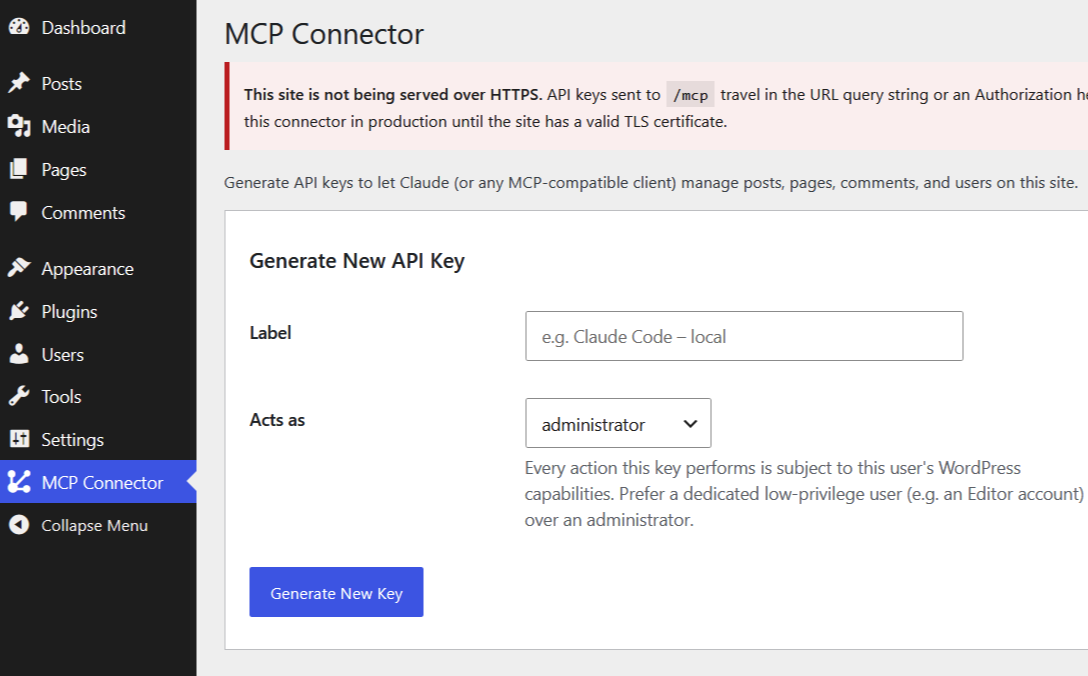
MCP Connector for Wordpress
MCP Connector turns any WordPress install into a remote MCP server — so an AI client like Claude can manage posts, pages, comments, and users through API-key-authenticated tool calls. No separate backend required.
Let Claude run your WordPress site.
MCP Connector turns any WordPress install into a remote MCP server — so an AI client like Claude can manage posts, pages, comments, and users through API-key-authenticated tool calls. No separate backend required.
Every request is authenticated by API key and then authorized against the real WordPress capabilities of the user that key is bound to. There is no parallel permission system to misconfigure.
A connector, not a plugin that phones home
It exposes one local endpoint you choose to share. Nothing leaves your server unless you point a client at it.
No separate backend
Runs entirely inside WordPress on $wpdb/mysqli. No pdo_mysql, no external service, no extra host to babysit.
API-key authentication
Keys are stored only as a SHA-256 hash — the plaintext is shown once and never recoverable. Revoking a key takes effect immediately.
Scoped to real capabilities
Bind a key to a low-privilege user and every action is authorized against that user's actual WordPress permissions.
Built-in rate limiting
Per-IP failed-auth budget out of the box — 20 attempts / 5 minutes, then a 429 with Retry-After. Tunable via filters.
Audit logging
Every tool call is logged and keyed to the client IP, so you can see exactly what a connected client did — and when.
Bearer or query string
Present the key as Authorization: Bearer or ?api-key= — whichever your connector UI supports. Header preferred to stay out of logs.
From plugin to connected in minutes
Drop it in and activate
Copy the mcp-connector folder into wp-content/plugins/ and activate it under Plugins.
Create a low-privilege user
Add a dedicated Editor (or lower) account for the connector. A leaked key then grants only content management — never full site control.
Serve over HTTPS, set permalinks
Switch permalinks to Post name for the clean /mcp URL, and use TLS — the admin page warns you if the site isn't on HTTPS.
Generate a key & connect
Under MCP Connector → API Keys, pick the user and generate. The full key and ready-to-use URL are shown once — copy them right away.
Connecting claude.ai instead? It needs a publicly reachable HTTPS URL — tunnel a local site first (e.g. ngrok http 443).
Everything Claude can reach
Ten tools across posts, pages, comments, and users — each gated by a real WordPress capability.
| Tool | Kind | What it does | Requires |
|---|---|---|---|
| list_posts / get_post | Read | Read blog posts | edit_posts |
| create_post / update_post | Write | Draft & edit posts | edit_posts |
| list_pages / get_page | Read | Read pages | edit_pages |
| create_page / update_page | Write | Draft & edit pages | edit_pages |
| list_comments / get_comment | Read | Read comments | moderate_comments |
| moderate_comment | Write | Approve, spam, trash or unapprove | moderate_comments |
| list_users / get_user | Read | Read users — email addresses never returned | list_users |
Designed to fail safe
The connector makes no outbound calls of its own. Authorization always defers to WordPress itself.
One source of truth for permissions
Every call is authorized against the bound user's real WordPress capabilities. Bind to an Editor, not an Administrator.
Keys hashed, shown once
Only a SHA-256 hash is stored. Plaintext appears a single time at generation and can never be retrieved afterward.
Per-IP rate limiting
A failed-auth budget via WordPress transients slows brute-force attempts — no external cache required.
No phone-home
The plugin never makes outbound network calls. It only exposes a local endpoint you explicitly share with a client.
Hand Claude the keys — the ones you choose.
Install the connector, generate a capability-scoped key, and let your AI client manage content directly. Open source under GPL-2.0.
Read the setup guide